What Makes a Listing Photo Look Fake (And How to Avoid It)
Buyers have gotten good at spotting an over-edited listing photo — not because they know what HDR blending is, but because something about the image just feels off. The sky's too perfect. The room looks a little too clean, a little too smooth. That instinct is usually picking up on a small set of specific, repeatable editing mistakes. Here's what actually causes a photo to read as "fake," and the difference between that and a photo that's simply been properly corrected.
Key takeaways
- Most "fake-looking" photos share the same handful of tells: unrealistic skies, window halos, bowed verticals, mismatched shadows, and over-smoothed textures
- These are almost always signs of over-processing, not a property that's actually been misrepresented
- Properly corrected photos fix exposure, color, and perspective without introducing any of these artifacts
- A photo that looks fake costs trust even when the underlying edit was technically honest — perception matters as much as the rule itself
- The fix isn't less editing, it's more careful editing — see our breakdown of where editing legitimately crosses a line for the rules side of this
1. The sky looks too perfect
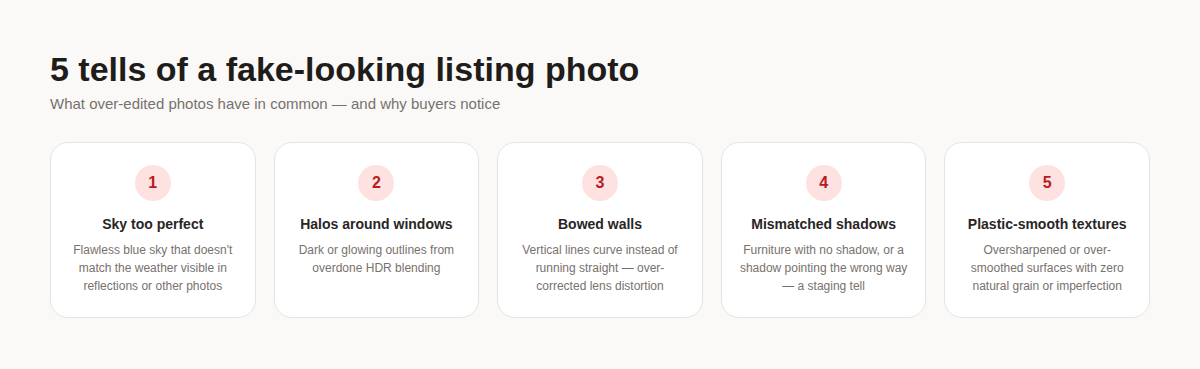
A flawless, saturated blue sky with zero clouds is one of the fastest ways a photo starts to feel synthetic — especially when it doesn't match the lighting everywhere else in the shot, or when the same unnaturally perfect sky shows up in every photo of the same listing regardless of what time each one was actually taken. Real skies have some texture to them: haze, a gradient toward the horizon, a cloud or two. A sky that's uniformly saturated edge-to-edge usually means it was replaced rather than corrected.
2. Halos and glow around windows
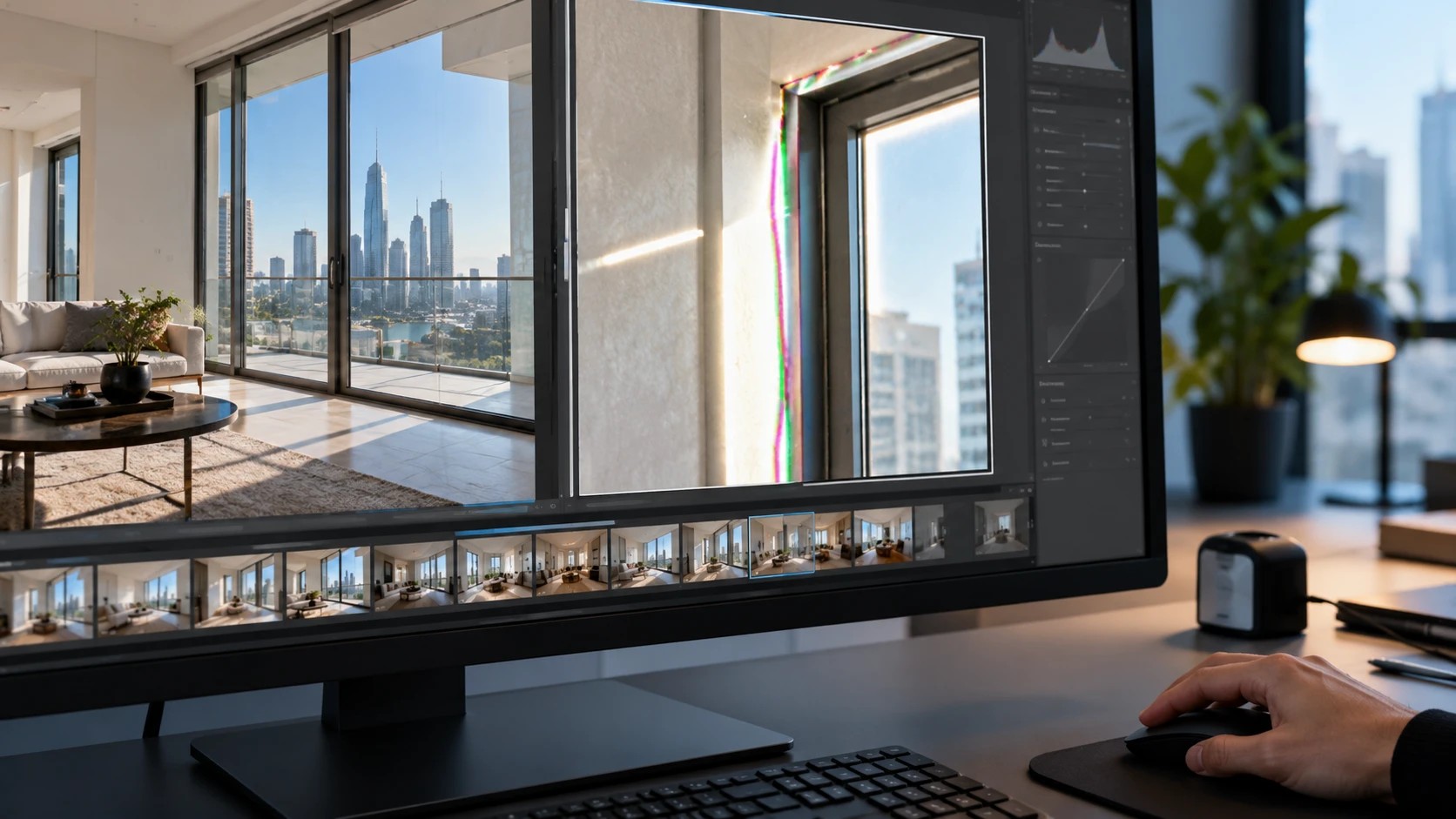
HDR blending — merging a darker interior exposure with a brighter window exposure so both are visible — is a normal, accepted technique. Overdone, it leaves a visible outline or glow around the window frame where the two exposures were stitched together. That halo is one of the most common tells of amateur or aggressive editing, and it's purely a processing artifact — it has nothing to do with whether the underlying correction was honest.
3. Walls and verticals that bow or curve
Wide-angle phone lenses naturally distort straight lines near the edges of the frame, and perspective correction fixes that — but overcorrecting in the other direction makes walls curve inward instead of running straight. A room with slightly bowed door frames or a ceiling line that arcs instead of running flat reads as artificial immediately, even to someone who couldn't explain why.
4. Shadows that don't match the light
This one shows up most in virtually staged photos: furniture placed into a room with no shadow underneath it, a shadow pointing the wrong direction relative to the window light, or a shadow with a hard edge when the room's actual lighting is soft and diffuse. It's one of the easiest things for a buyer to notice without being able to name it, and it's the single biggest giveaway that furniture was added rather than photographed. Disclosed virtual staging is generally fine — see our look at Dubai's actual staging rules — but badly matched shadows undermine it regardless of disclosure.
5. Surfaces that look plastic-smooth
Oversharpening and heavy noise reduction, pushed too far, strip out the natural micro-texture of real surfaces — fabric grain, wood grain, the slight imperfection in a painted wall. The result looks suspiciously clean, almost rendered rather than photographed. The honest fix is to correct exposure and clarity without erasing texture entirely; a room that still looks like a photograph, not a render, is the goal.
Why this actually costs you buyers
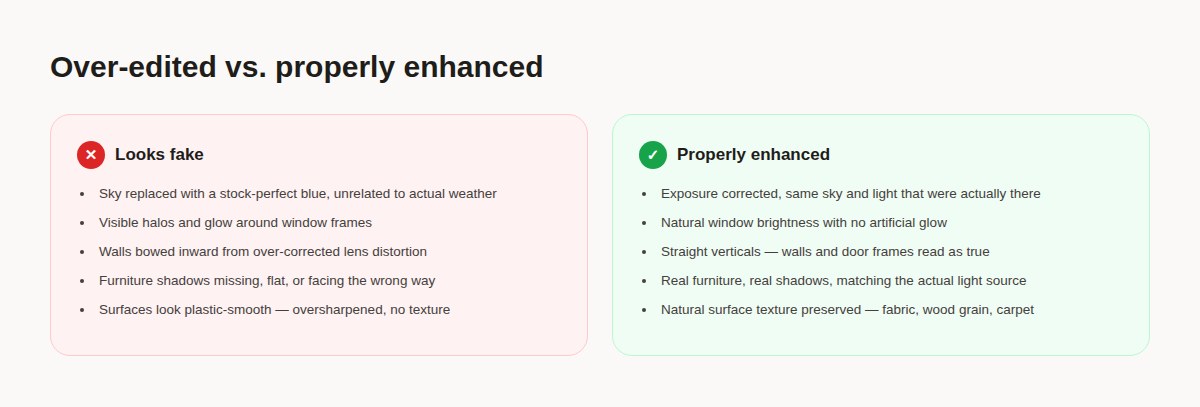
None of these five tells necessarily mean a photo crosses into actual misrepresentation — a hard-to-fix window halo doesn't change what the property is. But a buyer scrolling a listing gallery doesn't separate "technically honest but badly processed" from "deliberately misleading." Both read as the same thing: a photo they don't fully trust. And the moment one photo in a gallery looks over-edited, buyers tend to apply that same suspicion to every other photo in the set, even the ones that are completely accurate. The cost isn't a rule violation — it's the viewer's confidence in the listing.
What properly corrected photos do differently
- Exposure and color correction that matches the light actually in the room, not a stock-perfect replacement
- HDR blending subtle enough that window brightness looks natural, with no visible seam or glow
- Perspective correction that straightens true distortion without overcorrecting into a curve the other way
- Clutter removal only — never adding, moving, or restaging furniture without disclosure
- Clarity and sharpening applied conservatively enough that natural texture survives
This is the exact standard LiftMyPhotos is built around — correcting exposure, color, and perspective on the room exactly as it was photographed, without pushing any of those corrections into the territory that makes a photo start to look synthetic. Upload a raw phone photo and get back a version that looks like a well-lit, well-shot version of the same room — not a different room, and not an obviously processed one. Before you even get to enhancement, run the photo through our free photo quality checker to catch blur or exposure problems, or our watermark remover if an old logo or stamp needs to come off first.

Is a fake-looking photo the same as a misleading one?
Not necessarily. A photo can be technically honest about the property — same room, same layout, same view — and still look over-processed in a way that erodes buyer trust. See our guide to where editing actually crosses into misrepresentation for the rules-based distinction.
Is sky replacement always a problem?
It's a gray area rather than an outright violation in most guidance, but it's one of the fastest ways a photo starts to look artificial, and it risks showing weather or lighting conditions that weren't actually present when the photo was taken. Correcting the existing sky's exposure is safer than replacing it entirely.
Why do virtually staged photos often look more fake than real staging?
Usually because of mismatched shadows and lighting — virtual furniture that doesn't cast a shadow consistent with the room's actual light source is the most common tell, more so than the furniture itself looking unrealistic.
Does AI enhancement make photos more likely to look fake?
Only if it's pushed too hard. AI enhancement tools that correct exposure, perspective, and clutter conservatively produce photos that look like well-shot photographs. The "fake" look comes from aggressive processing, not from using AI specifically — the same overcorrection mistakes happen with manual editing too.
What's the fastest way to check if my own listing photos have these issues?
Zoom into window edges for halos, check that vertical lines (door frames, wall corners) are actually straight, and look at any staged furniture's shadow direction against the window light. Those three checks catch most of the common tells.
Correct the photo without making it look corrected — try LiftMyPhotos free, no credit card required.
Related reading


Try LiftMyPhotos on your next listing
3 free enhancements on signup. No credit card required.